Carbon AI Dashboard
Designed a conceptual AI-powered dashboard for Digiop Carbon's loss-prevention users—unifying task queues, real-time metrics, security-video review, and a natural-language AI agent into a single homepage, presented at ISC West 2025.
- Team
- 1 UX Lead1 PM1 VP
- Timeline
- 3 weeks
- Category
- B2B SaaS Platform
- Impact
- Validated AI concept → product backlog
Published: Apr 2025
TL;DR
As Head of UX at Everon, I was asked to imagine what an AI-native dashboard could look like for Digiop Carbon, a video monitoring and AI-powered business intelligence platform used by enterprise commercial organizations and retail security teams. In a three-week concept sprint with a Product Manager and our VP of Development, I designed a reimagined homepage that pulls a loss-prevention manager's most important work to the surface: a prioritized to-do list, at-a-glance progress gauges, system-surfaced security video for review, and a natural-language AI agent that lets users interact with the platform directly. The concept was to be presented at ISC West 2025 and was well-received by product and engineering partners. The concept was accepted into the product backlog as a future capability.
Context & Challenge
The Opportunity
Digiop Carbon gives retail loss-prevention teams a way to monitor exceptions, review security footage, and investigate cases across many store locations. But the value was spread across the platform—managers had to know where to look, remember what was outstanding, and stitch together signal from separate tools. The data was there; the prioritization wasn't.
I was asked to explore a forward-looking question: if we designed the Carbon dashboard around AI from the start, what would a loss-prevention manager's morning actually look like? The goal wasn't a production feature on a deadline—it was a credible, compelling vision to present at ISC West 2025 and to align product and engineering around a direction worth building.
Designing for the Loss-Prevention Manager
The user I designed for is busy, accountable for many locations, and time-constrained. They don't want to go hunting for problems—they want the platform to tell them what needs attention, in priority order, and let them act on it. That framing shaped every decision: the dashboard had to do the triage for the user, then get out of the way.
Design & Solution
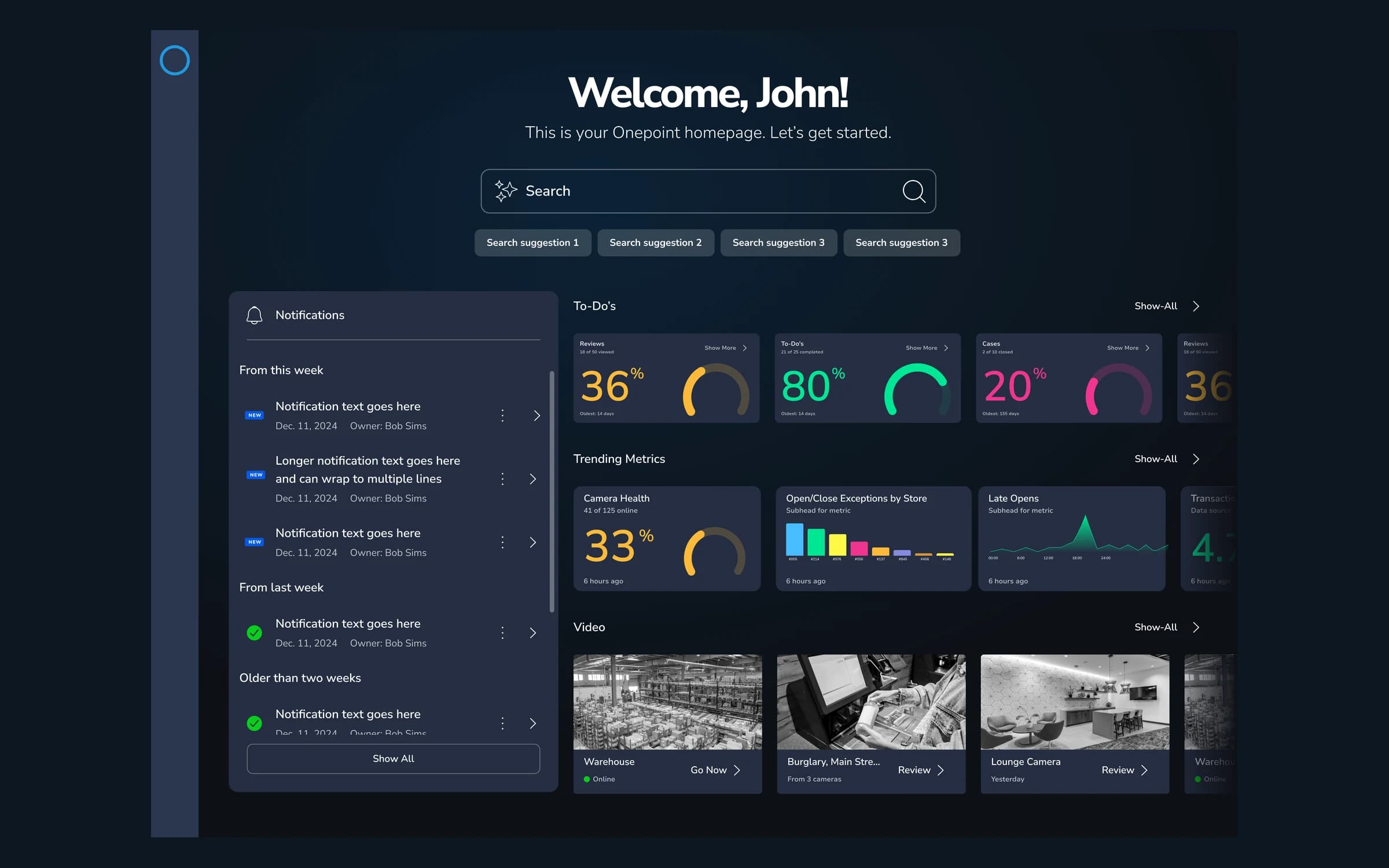
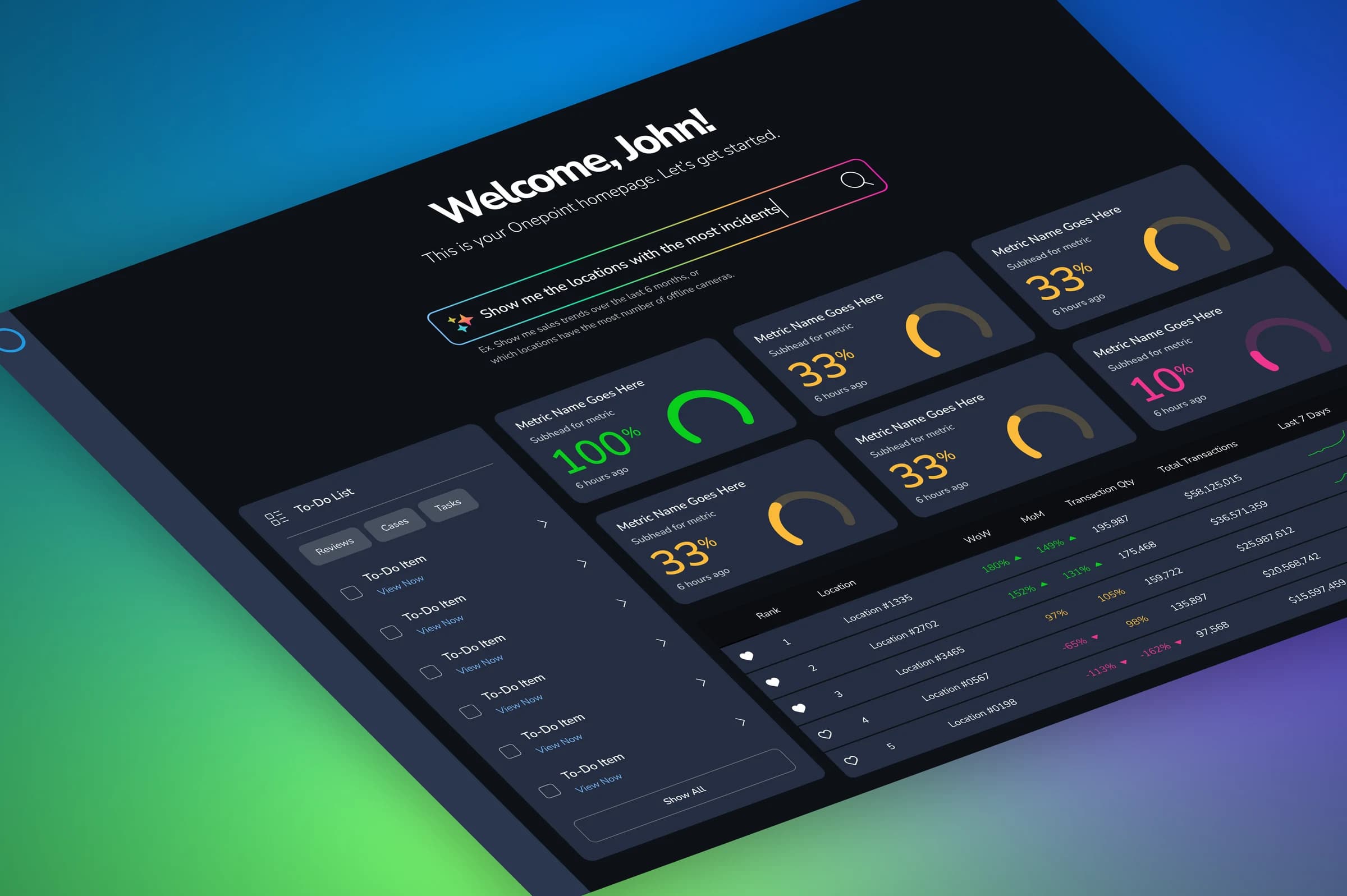
I designed a single Carbon homepage that opens with a personal greeting and a prominent AI search bar, then organizes the rest of the screen around four interlocking capabilities.
A prioritized to-do queue
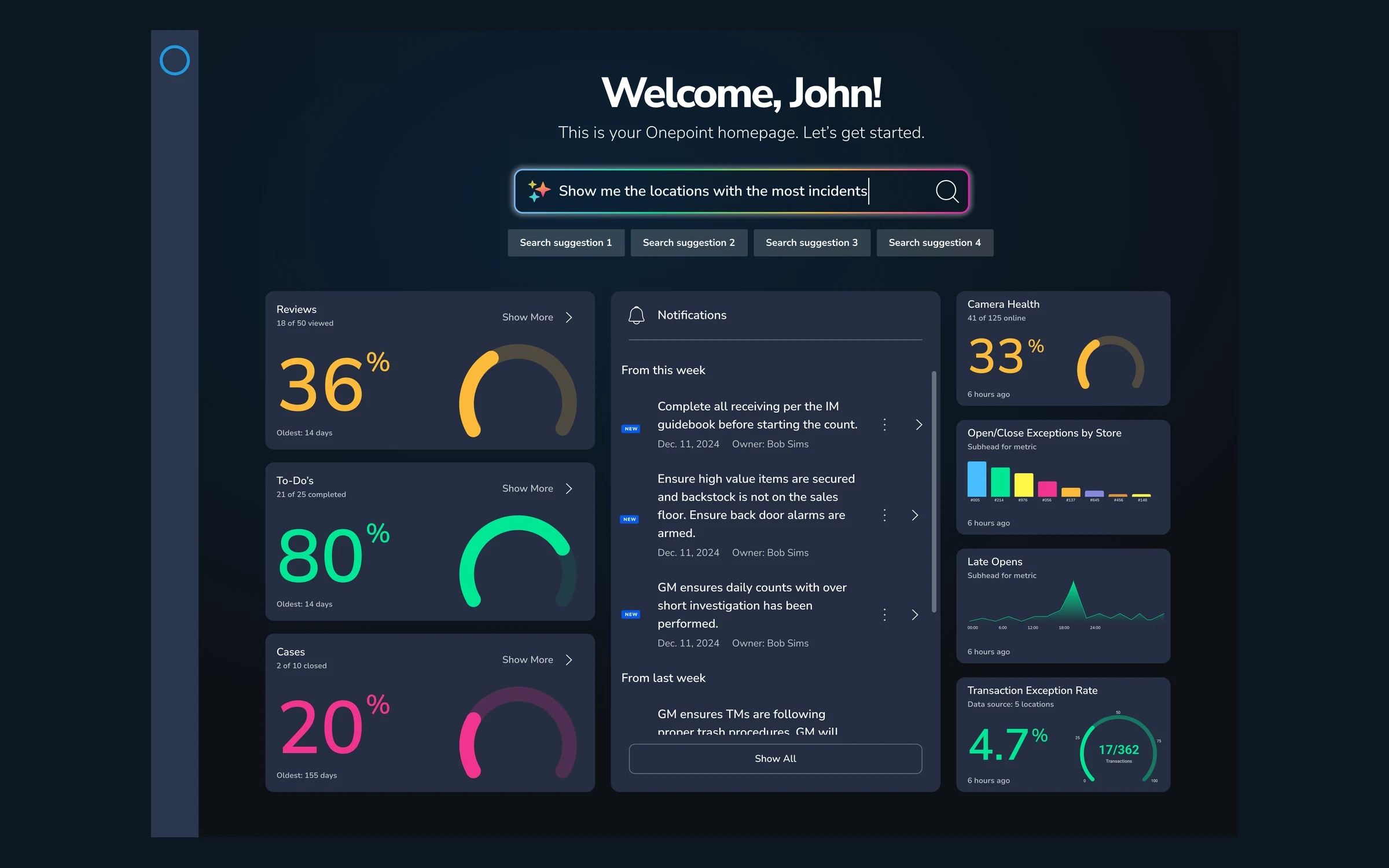
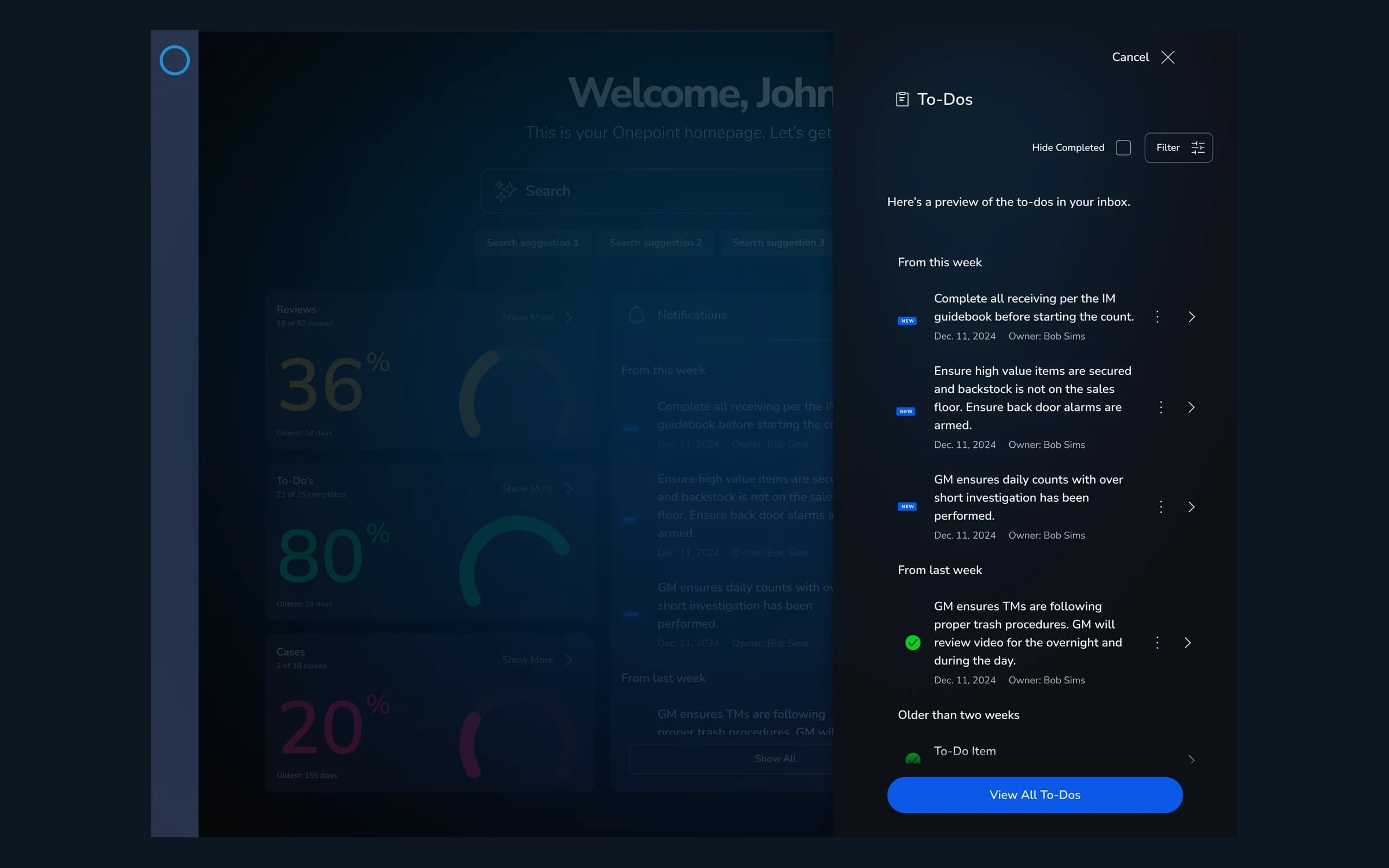
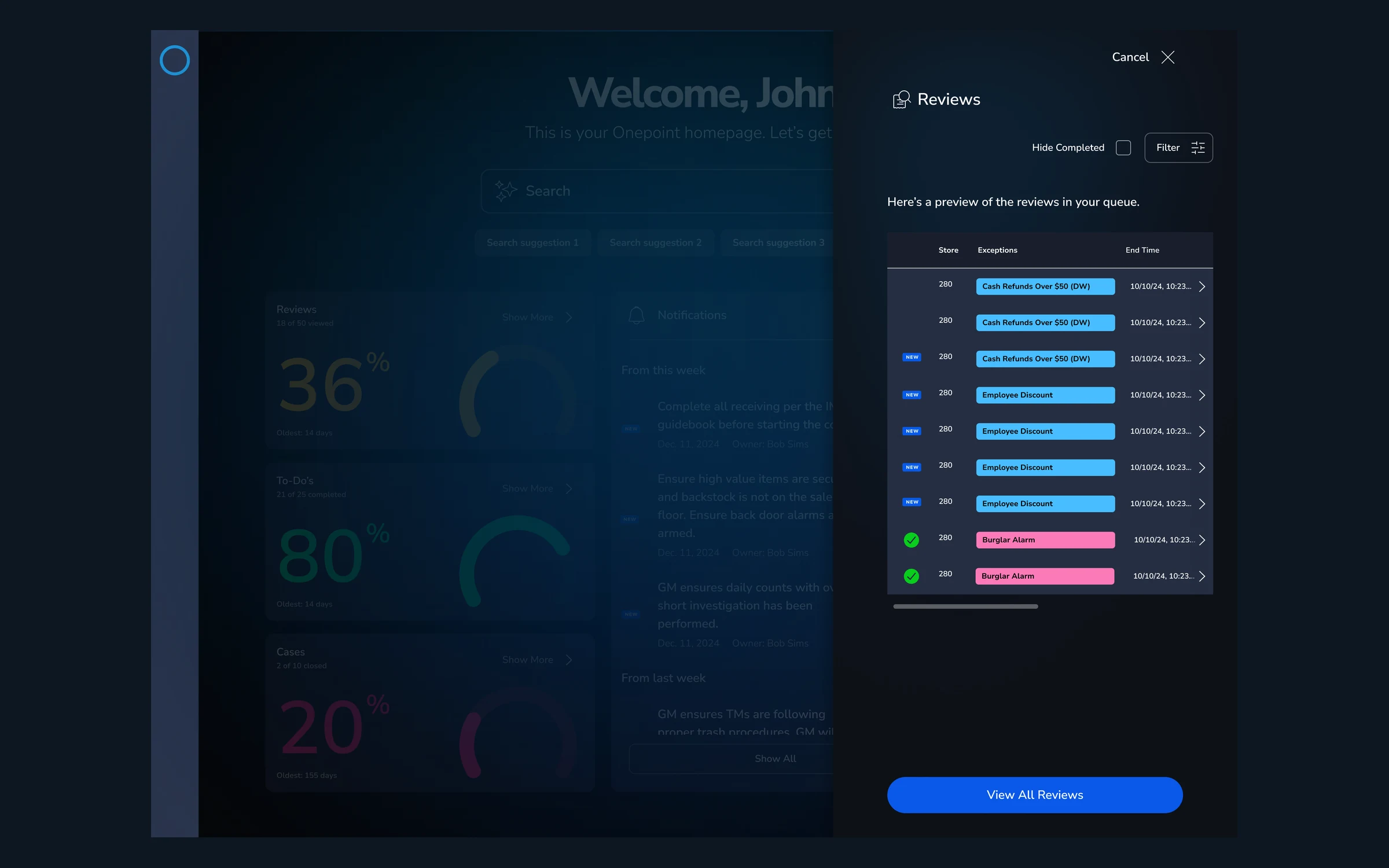
The most important thing a manager needs in the morning is a clear, ordered list of what's outstanding. I designed a task queue that surfaces real loss-prevention work—"ensure high-value items are secured and back-door alarms are armed," "complete all receiving per the IM guidebook before the count," "review overnight video for over/short investigation"—grouped by recency (this week, last week, older than two weeks) with owners, dates, completion state, and a filter to hide finished items. The queue spans task types the platform already tracks: Reviews, Cases, and Tasks.
Gauges and data visualization
Above the queue, I designed a band of progress gauges and trending metrics so a manager can read the health of their operation in seconds. The gauges track completion across Reviews, To-Dos, and Cases; the trending row covers operational signals like Camera Health, Open/Close Exceptions by Store, Late Opens, and Transaction Exception Rate—mixing radial gauges, bar charts, and sparklines so each metric is shown in the form that reads fastest. The intent was glanceability: progress and anomalies legible without interpretation.
System-surfaced video review
Loss prevention lives in the footage. Rather than make managers go find clips, I designed a video row where the system pulls relevant security footage forward for review—warehouse, point-of-sale, and camera locations—each clip framed as an action ("Go now," "Review") so footage becomes a task, not a search.
A natural-language AI agent
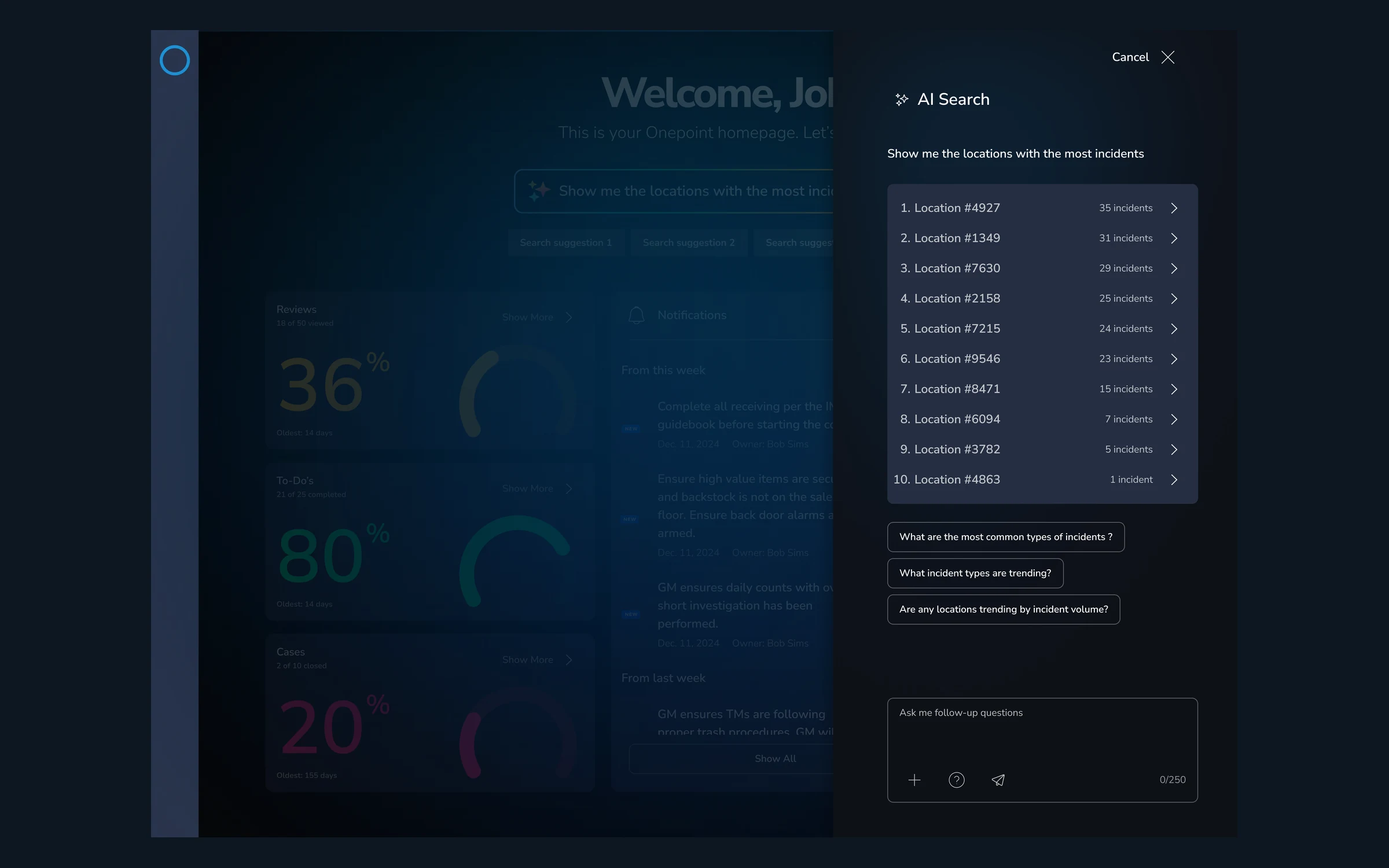
The centerpiece is an AI agent invoked through the dashboard's search bar. Instead of learning the platform's structure, a manager can simply ask—"show me the locations with the most incidents," "show me sales trends over the last six months," "which locations have the most offline cameras." I designed the entry point with suggestion chips and example prompts so the capability is discoverable, and so users could begin to imagine the range of what an agent inside Carbon could do for them—from pulling reports to triaging exceptions to ideating on next steps.
Leadership & Collaboration
This was a small, fast, senior team—me as Head of UX, a Product Manager, and our VP of Development—working in a compressed three-week window before the conference. A few things mattered:
- Setting the conceptual frame. I anchored the work on the loss-prevention manager's morning rather than on a feature list, which kept the team aligned on why each element was on the screen and prevented the dashboard from becoming a dumping ground for every data point we could show.
- Designing with engineering in the room. Having the VP of Development involved from the start meant the concept stayed grounded in what was plausible to build, so the vision read as a credible roadmap rather than a flight of fancy.
- Designing for the room it would be shown in. Because this was going to ISC West, the work had to be polished and self-explanatory on a show floor—legible at a glance, narratively coherent, and impressive without a presenter walking through it.
Impact & Outcomes
The concept was presented at ISC West 2025 as a proof-of-concept for where the Carbon platform could go. It was well-received by product management and engineering partners, and was accepted into the product backlog as a future capability—influence on the roadmap, achieved through concept work rather than a shipped release.
These features didn't reach production during my time in the role, and I'm clear-eyed about that. But the value of the work was in moving the organization's thinking forward: it gave product and engineering a concrete, shared picture of an AI-native Carbon—one where the platform triages a manager's day, surfaces the right video, visualizes the right metrics, and answers questions in plain language. The exercise demonstrated how quickly a small senior team can turn an open-ended "what if" into a credible, buy-in-generating vision—and put AI-forward product direction on the table ahead of the roadmap.